How to Print Almost Any 3MF File Without Converting It First

Did you know you can even unzip a .3mf file to see its contents? Did you know that there are printable .3mf and "project" style .3mf?
3MF was supposed to make 3D printing files better. And in many ways, it did.
A 3MF can contain much more than an STL: multiple objects, their positions, scale, colors, materials, and even slicer-specific project information. But that extra information has created a new problem.
If you download a 3MF that was prepared for one printer or slicer, then try to use it somewhere else, and things can get messy fast.
- Maybe the model was downloaded from MakerWorld and prepared in Bambu Studio, but you own a Flashforge.
- Maybe it opens with the wrong printer profile.
- Maybe the objects appear outside the build plate.
- Maybe the slicer drops settings from the original project.
- Or maybe the software you need simply wants an STL instead.
The problem has become common enough that developers are now building dedicated 3MF conversion apps, desktop utilities, and even browser extensions just to move 3MF projects between printer ecosystems. These solutions are novel and solve a real problem.. but if your goal is to just print the model, there's another way.
Polar Cloud has handled 3MF files this way for years!
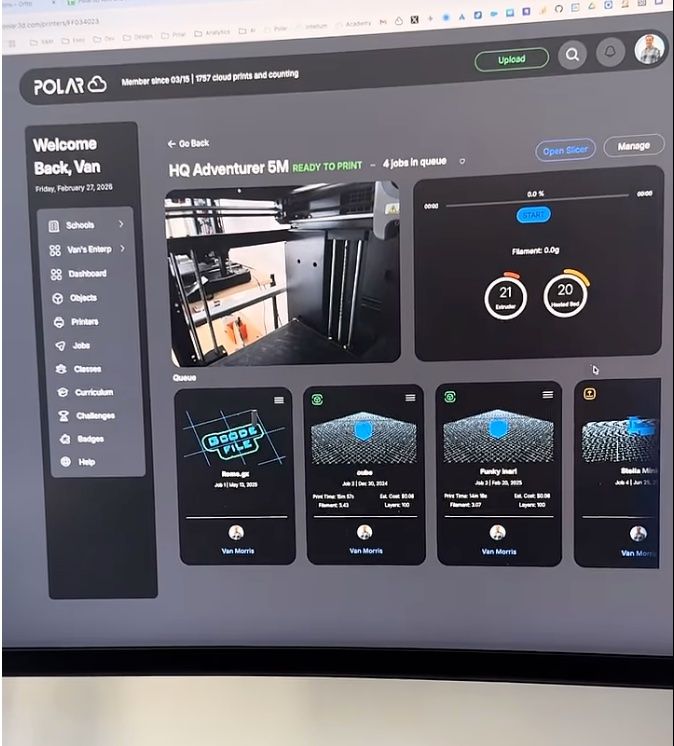
With Polar Cloud, you don't need to start by asking: What slicer was this 3MF made for? You can upload the 3MF directly to Polar Cloud and place it on a 3MF-capable Polar build plate. From there, choose the printer you actually want to use. Polar extracts the printable geometry from the 3MF, creates the STL geometry needed by our slicing system, slices it for the destination printer, and sends the finished job into that printer's queue.
The original file might be a 3MF. The printer might normally expect a completely different workflow. To the person trying to print something, that distinction largely disappears.
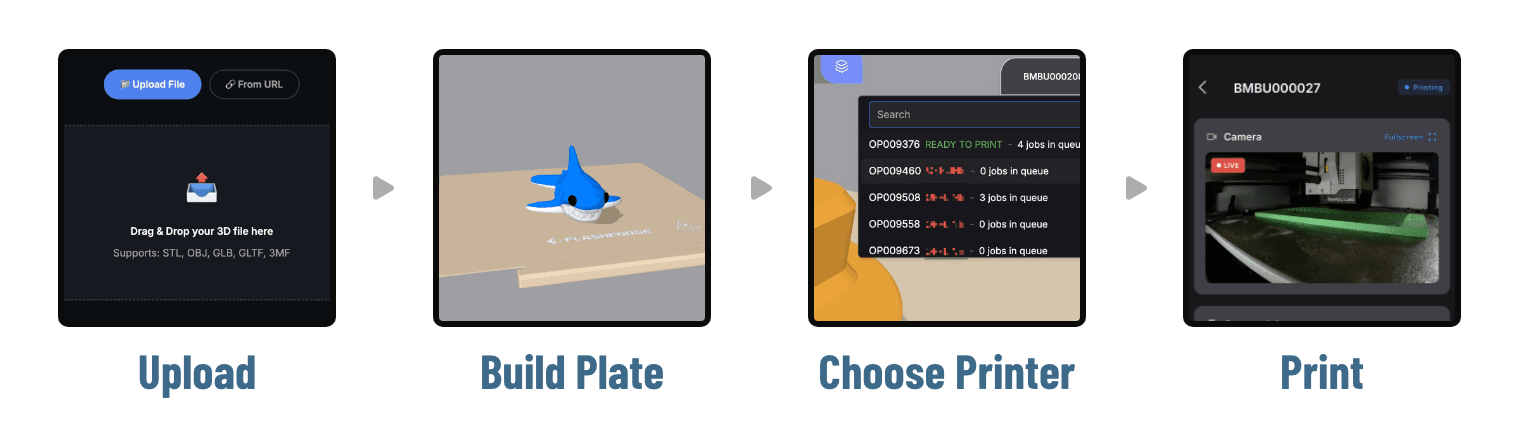
As you can see above, there's no manual 3MF-to-STL step. With software that supports you (the way you truly print), it really shouldn't even cross your mind.
- No exporting the model from another slicer first.
- No scanning the file list in MakerWorld or elsewhere to see what formats they offer you
- No separate conversion app standing between downloading a model and printing it.
The file format shouldn't be your problem
One of the fundamental ideas behind Polar Cloud is that users shouldn't have to become experts in all the plumbing between a 3D model and a 3D printer. If you have a model and a compatible printer, the software should do as much of that work as possible. That matters even more now that 3D printing has become increasingly fragmented by manufacturer ecosystems.
Consider the following scenarios:
A model found online might have been prepared on a Bambu printer.
You might want to print it on a Flashforge. The printer across the room might be a Prusa. Another classroom, makerspace, or print farm might have all three.
We don't think that should require three completely separate libraries of models.
And we definitely don't think the person printing should have to understand all of the file-format conversions happening underneath. The model is what you want to print. The printer is where you want to print it. Polar Cloud handles the workflow in between.
What about the settings inside the 3MF?
There is an important distinction here. Some newer 3MF conversion tools are specifically designed to translate slicer settings from one printer ecosystem to another. That's useful! For sure.
A 3MF project can contain information such as layer height, walls, infill, support configuration, filament assignments, painted areas, and machine-specific parameters. Moving all of that intelligently between different slicers is a different problem from simply making the model printable.
Polar Cloud's workflow is focused on the destination printer. We take the printable geometry from the source file and slice it using the settings and printer configuration selected in Polar Cloud. That means you don't have to trust machine-specific settings that were created for a completely different printer.
If preserving every carefully tuned setting from the original 3MF project is important to you, a specialized project-conversion tool may still be useful (checkout r/FlashForge for several options).
But a lot of the time, that's not what somebody wants. They just found a model. They want to print it! And they don't want to spend fifteen minutes figuring out why their slicer doesn't like the file. That's the problem Polar Cloud eliminates.
What if I really do need an STL?
If you're sending the file to someone who only accepts STL, or working with older software, sometimes you genuinely need to convert the file. Or maybe you just want the geometry without the rest of the 3MF project. We have you covered there too!
Polar Cloud offers a free online 3D Model Converter that supports STL, OBJ, GLB, GLTF, and 3MF files.
You can use it to convert a 3MF into an STL without installing another slicer or desktop application. The converter runs locally in your browser using WebAssembly, so your model does not need to be uploaded to a conversion server just to process it. Guests can use it for free, and Polar Cloud users can make unlimited conversions.
If that's really what you need, a quick way to turn 3MF → STL, then use our free converter.
But if all you want to do is print the file you found, regardless of the filetype or printer it was made for, then don't convert it at all. Don't even t hink about it. Upload it to Polar Cloud and print it.
It's exciting to see developers tackling 3MF interoperability. The number of new tools appearing around the problem shows just how much friction still exists when files move between printer ecosystems.
But interoperability shouldn't require every 3D printer owner to understand the underlying problem. That's what software is for.
At Polar, we've spent years working toward a simple idea:
Your models shouldn't belong to a printer brand.
- Upload the file.
- Choose the printer.
- Print it.
Let Polar Cloud worry about everything in between!
Subscribe for updates
Get Polar Cloud news and help delivered straight to your inbox.
More from the blog