Slice and Queue All Your Build Plates at Once With Polar Cloud

Most projects aren't one part. A cosplay helmet, a set of drawer organizers, a robot kit, a class set of name tags: they're a pile of parts that won't all fit on one bed.
The usual workflow is tedious. Arrange the first plate, slice it, send it. Go back, clear the plate, arrange the next one, slice it, send it. Repeat until you've lost track of which parts you've already printed.
Polar Cloud lets you lay out the whole project at once, across as many build plates as you need, and queue every plate in one click. It all happens in your browser. No other browser-based slicer does that.
See it in action
Can't see the video? Watch it on YouTube.
How it works
- Open the build plate in Polar Cloud and add your first parts.
- Add another plate. Your plates show up as thumbnails down the left side, so you can jump between them.
- Lay out each plate on its own. Move, scale and rotate parts, and duplicate a part right from the plate list when you need several of the same thing. Every plate keeps its own layout.
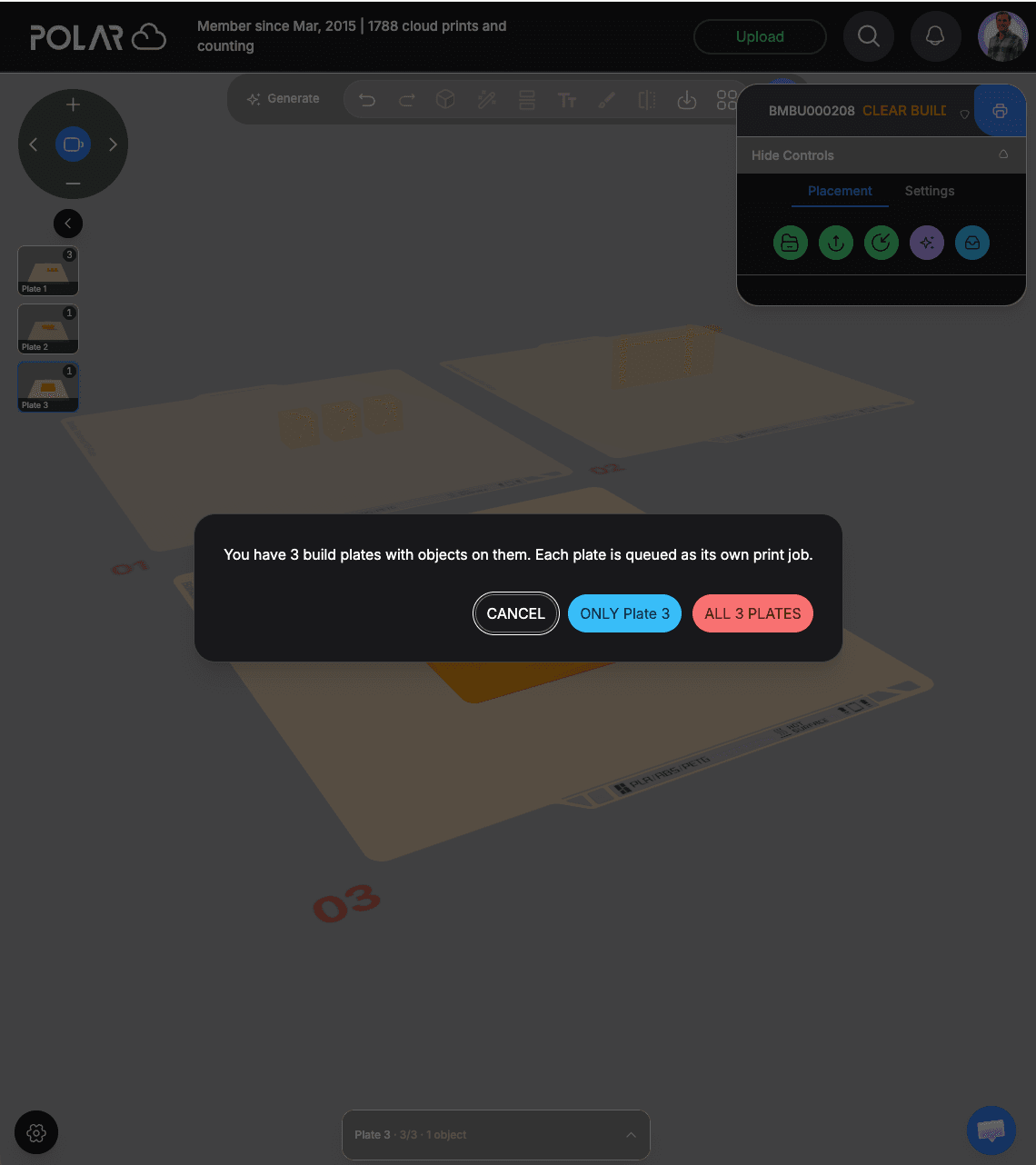
- Hit print. Polar Cloud asks whether you want to print just the plate you're on, or all of them.
Choose all plates, and each plate is sliced and queued as its own print job. Your printer's queue now holds the whole project in order, so you can run them back to back, overnight, or across the week.
Why it's better than one plate at a time
- Plan the whole project up front. See every part laid out before you print anything, and catch the one you forgot.
- One click instead of ten. No clearing the plate and starting over for each batch.
- Each plate stays its own job. If one plate fails, you reprint that plate, not the whole project.
- It works with your queue. Combine it with Polar Cloud's print queue to reorder plates, move one to the front, or send a plate to a different printer.
Who it's for
- Makers with multi-part projects: kits, cosplay, organizers, replacement parts.
- Small shops and print farms batching orders onto full plates.
- Teachers printing a full set of student parts without babysitting the slicer.
Free vs. Polar Cloud+
Anyone can lay out multiple plates. On the free plan, you print one plate per job. With Polar Cloud+, you can queue every plate at once, each as its own print job, along with the full slicer settings, bigger files and 3MF uploads.
Ready to try it? Open the build plate, or create a free Polar Cloud account and connect your printer first.
Subscribe for updates
Get Polar Cloud news and help delivered straight to your inbox.
More from the blog